Diagram Editors
You can edit graphic representations of structures, relationships and flows in diagram editors.
You can edit graphic representations of structures, relationships and flows in diagram editors. The basic functions are the same in all diagram editors.
You can use the Design tab to drag an element from the gallery in the ribbon and drag it in the diagram. You can link these diagram nodes with diagram edges available in the diagram node's context menu and, in doing so, model relationships and flows.
There are special prerequisites and automatisms for certain diagram types. UML activities (activity diagrams) and UML state machines (state diagrams) cannot be created without reference to a classifier (behaviored classifier) with the behavior they are describing. These automatic processes are there to make things easier for you and help maintain consistency in diagrams (keyword: special concepts).
All diagram elements have a minimum size that cannot be changed. The dashed line under the head of a lifeline, for example, is at least 15 raster cells high.
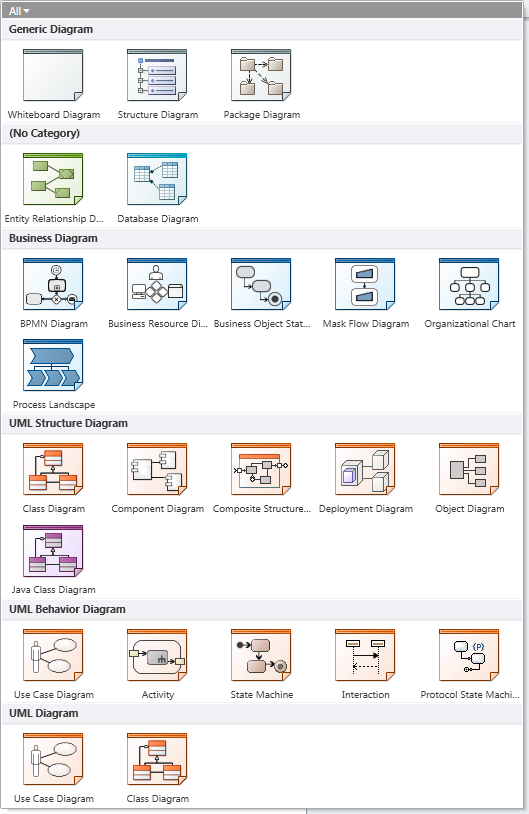
Figure: (Enterprise Edition) diagram types
This chapter contains the following topics:
Editor for Animation Path for Business Processes
Editor for BPMN and Mask Flow Diagrams
Editor for Diagrams for Business Object States
Editor for Business Resources Diagrams and Organization Charts
Editor for UML Structure Diagrams
Editor for UML Activity Diagrams
Editor for UML Use Case Diagrams
Editor for UML Class and Object Diagrams
Editor for UML Component and Package Diagrams
Editor for UML Composite Structure Diagrams
Editor for UML Sequence Diagrams