Structuring a Model
You can structure an Innovator model using system and partial models, components, packages, diagrams and create templates.
How to Structure a Model
A model's structure is determined by how the elements are linked by relationships. Owner relationships for the elements are essential for this as the model's hierarchy is determined by them and they set that each model element must have precisely one owner, regardless of its other relationships. Profiles used in your model determine the structuring options of a concrete model structure. The configuration specifies e.g. whether an element can be created in a container, i.e. whether the container can own it.
Certain element types are available for structuring a model, in particular packages and components. Create defaults, which are modeled as a special dependency, are used to direct elements to a particular container on creation. You can create the best overview of the create defaults in the model using the appropriate component diagram.
| Element | Icon Example | Use |
|---|---|---|
| System Model |

|
System models define a software system, provide common profiles for their partial models and form their root. Innovator models can contain multiple system models if required. |
| Model |

|
Submodels enable structuring at the top-most level within a system, e.g. in various areas of business or modeling phases. |
| Package |

|
Packages are a structuring element without further semantic. They correspond to a folder in a file system. It is possible that packages only contain references so that you can create any number of compilations (e.g. for documentation). |
| Component |

|
Components are a semantic grouping of elements which belong together and show an entity in their own right; often a software component. |
| Diagram |

|
Diagrams are the essential structure element for modeling relationships between model elements. (Due to their exceptional position as a means for visualizing, they are offered separately and not as normal elements in the ribbon. This is why they do not appear in the Model Structure submenu.) |
| Create Default | In Innovator, create defaults are modeled as a special dependency between packages or components. They are used to redirect elements into another container (package or component) and thus to a particular owner upon creation. |
You basically structure your model using packages and components; system and submodels are special packages. For packages and components, you can use the create default to redirect specific elements – on creation only – to other packages or components, and thus to a particular owner. In Innovator, create defaults are modeled as a special dependency.
You can e.g. structure your model by grouping its elements according to certain criteria and combining them in a respective package. You can specify the criteria which you structure your model by as desired. This means that you can e.g. sort elements according to their type, thereby combining all of a type's diagrams in one package. If you already want to display your model's architecture, you can also set up a package for various components from your system. Of course, any combinations of these approaches are also possible.
A model or model system's is structurally designed as one of the configurator's administrative tasks. They set the starting point and level of modeling freedom, as well as the profiles provided and the structure elements already found in the model template. These basic settings are used in the modeling phase. Extensions and changes to the model structure are only possible in exceptional cases without respective customizations made to the profile. For the most part, collaboration of owners and assigned elements are created to suit each other. Vice versa, e.g. deleting an existing create template in the model violates these relationships and massively limits the modeling options.
You can view the model's existing structure in the Model Contents tool window (Model Structure view).
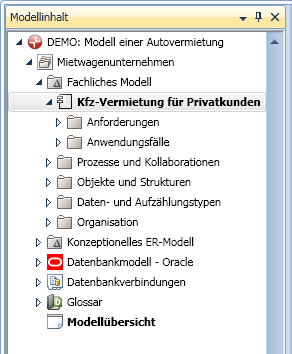
The example shows the structure of a business model which has multiple subpackages, e.g. one for assigning processes, one for use cases etc.
When working with structure elements, the following properties must be taken into consideration:
- Hierarchical Structure
Structure elements can be structured hierarchically. Each structure element can contain as many other structure elements as required. - Model Root
A model's topmost structure element - the model root - is automatically there. It contains the name of the current model and cannot be deleted. - Identifying an Element
Each model element has an owner. The element is identified by its path in the model structure, its name and its element type. An owner cannot have two elements with the same name and type (in spite of Universally Unique Identifier).
This also applies for the structure element itself.
Mode of Operation for Create Defaults
Create defaults are used to redirect elements into another container and thus to a particular owner. The container for a new element is normally based on the selection. This means that e.g. the class diagram's container is always actually used as the class' container as standard when a new class is created in a class diagram.
It may be the case that you want to use another container. You can e.g. collect all primitive types in one container that the selection should choose, regardless of the container. Create defaults are used for this.
A create default is created between two packages or components. The Redirected Stereotype property is set for each create default. The is Default property can be used to set whether this redirected stereotype should be used as the default.
The evaluation differentiates between whether the stereotype of the element to be created is known or not. If you create an element directly using a menu item, then a create template for a particular stereotype is evaluated and the stereotype is known. However, there is also the case that an element is only indirectly created. If this is the case, the stereotype is not normally known.
Let us initially assume that the stereotype is known. Based on a selected element, a possible container is evaluated when a new element is created. The configuration then checks for this container whether the new element can be created in it. If this is the case, this container is used and any create default present will not take effect.
If the container cannot be used, then outflowing create defaults are searched for, starting from this container and working back to the root. The first create default that has the Redirected Stereotype property set for it or one of its super-stereotypes sets the container to be used by using its target element. It is sufficient to redirect the common super type if you want to redirect multiple stereotypes of one element type.
If the stereotype is not know, the is Default property is used. A create default is also looked for in this case starting at the selection's container in the direction of the root. The first create default which has the is Default property activated and a stereotype for the desired element type set is used. In this case, the create default initially provides the stereotype of the element to be created. The process for creating an element is then carried out using the known stereotype. i.e. the selection's container could theoretically be considered as the new element's container if this allows the stereotype as content. In this case, a create default does not necessarily take effect as container redirection, but first of all as stereotype allocation.
The container identified using the create default should permit elements with the selected stereotype as content. Otherwise this will lead to an error message when creating the element.
The Copy Package Hierarchy, Target Package Stereotype and Create Template properties are only used in engineering actions via the API.
e.g. The engineering actions are a field of application for mapping. A template which should be used with a predefined stereotype for an element to be created is set as the create template.
Changing the create defaults normally collides with the configuration on the modeling side of things; this then has an effect on the implemented intentions of the model. The configured owner relationships determine the permissible targets of a create default. The main aspect on the modeling side of things is to maintain storage transparency of directly or indirectly newly-created elements.
Structuring a Model with Packages and Components
Prerequisites
In the configuration, elements need to be able to be created in the container, i.e. have an appropriate owner relationship of the element type. Corresponding create templates also need to exist and be set up as ribbon commands. If a structure element can be created in the selected container, then the element is directly created. If this is not the case, a dialog appears for selecting a permissible owner that you can also created, if needed.
Context
Structure elements are created to aid concrete structuring on a model by using the options offered in the profiles. Structure elements need to be configured as owner of the direct element or the elements assigned using create defaults.
How to proceed
- Select the model element in the model structure which you want to create a structure element below.
-
If you want to create a sub package, select the structure element you want to create from the Start>New>New Subpackage submenu.
If the structure element can be created in the selected model element, then the element is created and the name is automatically selected to be edited. If this is not the case, a dialog appears beforehand to select the owner that you may also have to create if necessary.
-
If you want to create a component, select Start>New>New Element>Model Structure>Components.
If the component can be created in the selected model element, then it is created and its name is automatically selected to be edited. If this is not the case, a dialog appears beforehand to select the owner that you may also have to create if necessary.
- Enter the name of the structure element and press the [Enter] key.
Recognizing Create Defaults in the Model
Context
A create default is a special dependency and is used for redirecting directly or indirectly created elements into another container. The easiest way find out which create defaults exist in the model or model branches is to perform a search. The search returns the create defaults for the dependency's owner. Create defaults have the following extended naming structure in the result region:
Redirected stereotype@Name of the create default@Target of the redirected stereotype@Owner of the create default
How to proceed
- Select the model root in the model tree to determine create defaults in the whole model; select the respective (sub)model for model branches.
-
Select Start>Browse>Find>Find Name.
The Find dialog appears.
- Select the Create Default entry from the Find Element Type drop-down list, e.g. by quickly typing "Crea".
-
Click on Find.
The create defaults that exist in the model are listed in the result region.
Recognizing Create Defaults in a Structure Element
Prerequisites
It only makes sense to set-up a create default for structure elements. A model, package or component can be the owner or target for create defaults. The browser configuration needs to be set-up in such a way so that the create defaults are shown in the Details tool window.
Context
Create defaults are normally shown for the owner and target in the Details tool window. They have the following structure:
Owner: - Redirected stereotype -> Target of the redirected stereotype
Target: <- Redirected stereotype - Owner of the create default
Create defaults are always listed in the Info tool window, as well as Assigned Elements and Dependencies. They have the following structure:
Assigned elements: Create default «createRedirect» 'Redirected stereotype@Name of the create default@Target of the redirected stereotype@Owner of the create default'
Dependencies: Element type «Stereotype» 'Name' (of the target structure element)
How to proceed
- Select the structure element that has the create default you want to determine.
-
Select View>Window>Tool Windows>Details to see create defaults in the Details tool window.
The structure element's create defaults are shown in the Details tool window.
-
Click on the
 icon in the
  menu to be able to see create templates in the Info tool window .
The structure element's create defaults are shown in the Info as Assigned Elements and Dependencies.