Program Interface - What's Where?
The Innovator program interface primarily consists of the ribbon, workspace (start page or model page) and status bar.The model page shows the model in the central document area (shows diagrams, tables and specifications) and in various tool windows (Model Contents, Details, Properties etc.).
 Where Can I Find ... in the Program Interface?
Innovator splits its application windows' workspaces into two different types of "pages":
-
Start Page makes it easy to access recently opened models and allows you to create new models. You can also use it for accessing other information about Innovator.
-
You can edit a model on the model page. These pages are then split into the document area and various tool windows.
You can see the start page and which models are open using the status bar of the tab you are currently on.
Window Components on the Model Page
The application window contains a central document area and various tool windows within a model page. Documents (i.e. diagrams, tables and specification texts) can only be assigned within the central document area.
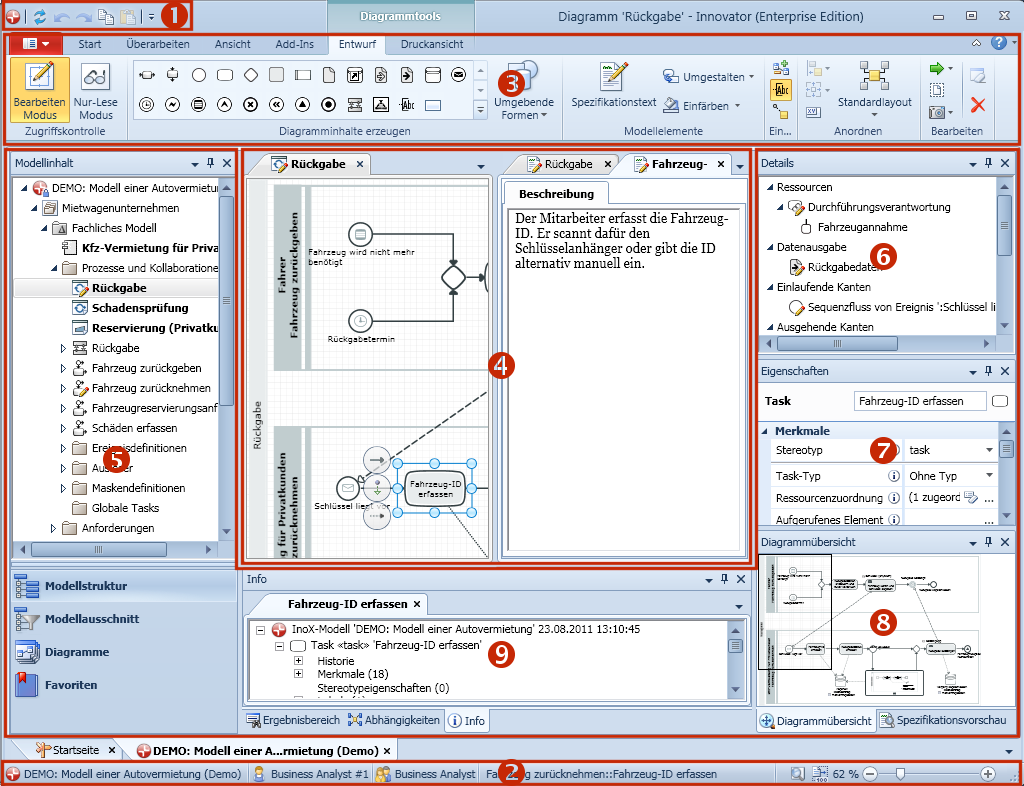
Key
(1) System Menu and Toolbar for Quick Access
(2) Status Bar with Zoom Settings
(3) Ribbon with Application Menu, Tabs, Groups, Galleries and Commands
(4) Document Area for Diagrams, Tables and Specification Texts
(5) Tool Window Model Contents
(6) Tool Window Details
(7) Tool Window Properties
(8) Tool Windows Diagram Overview and Specification Preview
(9) Tool Windows Result Region, Info etc.
 icon (entire diagram: the entire diagram is shown.)
 icon (original size: zoom to 100%)
Please read the following chapters for use of program interfaces: