Editing an Operation's Declaration
Operations are used to describe the behavior of objects. The totality of the operations of a class defines the possible interactions with objects in this class.
Prerequisites
You have created an operation in the class. You create an operation in the same way as an attribute.
Context
The name is not the only deciding factor for an operation, the amount and type of input and output parameters also play a role. Here you can find out how to edit an operation's whole declaration here.
How to proceed
-
Select the operation in the class with the left mouse button.
The selected operation has a blue frame around it.
-
Select the Edit Declaration command from the operation context menu or press the shortcut [Ctrl]+[F2].
The dialog for editing the declaration opens. The multi-row editing field initially contains the name of the operation and an empty parameter list, e.g. "
Operation()". -
Enter the name of the first parameter between the parentheses followed by a colon.
The input help opens and shows all known classifiers in the model in alphabetical order as this parameter's type:
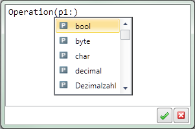
Entering the first few letters shortens the input help to the types that still match step-for-step.
-
Select the type you are searching for in the input help list.
The parameter's type is adopted in the editing field after the colon.
- In order to define further parameters and their type, enter a comma and repeat steps 3 and 4.
- In order to define output or input/output parameters, enter the key word
outorinoutbefore the parameter name. - In order to define the return type for the operation, enter a colon after the closing parentheses and repeat step 4.
- In order to apply the declaration, click on
 or press the shortcut [Ctrl]+[Enter] in the edit field.