Configure Your Own Verification Actions
You can check your model for syntactical and methodical accuracy using single verifications you have programmed yourself. You can integrate these single verifications into the Model Verification Wizard using a verification action.
Familiarizing Yourself with Verification Actions
When using a model, the quality of the model is crucial. However, there should be no constraints on the modeler when creating a model. Especially when the modeling is being carried out in a team, it is necessary to ensure the model quality. Automated model verification is therefore necessary, which verifies the entire model or a section of it in accordance with set rules.
The person setting up the verifications creates a verification action which is available in the wizard to all model users (but not to the model guest). The localized name of the verification action and the localized description are shown in the Model Verification Wizard based on the interface language set ($INOLANG).
A verification action comprises single verifications that can be grouped by function.
A single verification can be a verification for a particular customer, programmed in a .NET language or in Java. You can also integrate verification routines as single verifications.
Editing Verification Configuration
Configuration
In order to be able to use a verification action, it must be contained in the configuration. The verification configuration can contain multiple verification actions.
The configuration is contained in the $INODIR/inoverify.xml file.
An example of the file is as follows:
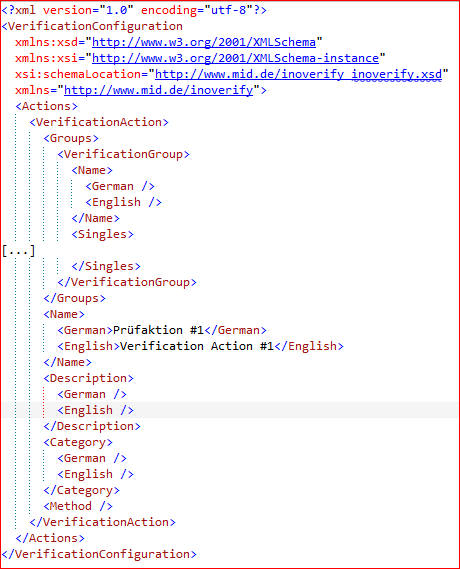
The file must be manually maintained by the person setting up the verifications. Following any changes to the file, Innovator must be restarted so that the changes can take effect; this is because the configuration is only read by Innovator on start. The schema is contained in the $INODIR/inoverify.xsd file. The schema determines the namespace (XML-Namespace http://www.mid.de/inoverify.
The following can be configured on the verification configuration (XML element VerificationConfiguration):
- Lists of verification actions (XML element Actions)
Verification Action
The following can be configured on the verification action (XML element VerificationAction):
- List of verification groups (XML element Groups)
- Localized name of the verification action (XML element Name)
- Localized description of the verification action (XML element Description)
- Localized name of the category to which the verification action is assigned (XML element Category)
- Name of the method (XML element Method)
Verification Group
The following can be configured on a verification group (XML element VerificationGroup):
- Localized name of the verification group (XML element Name)
- List of single verifications. This list includes the single verifications for Java and .NET languages and for verification routines (XML element Singles)
For the localized text, in each case the English text can be maintained in the subordinate XML element English and the German text can be maintained in the subordinate XML element German.
Configuring Single Verifications
Generic Single Verification
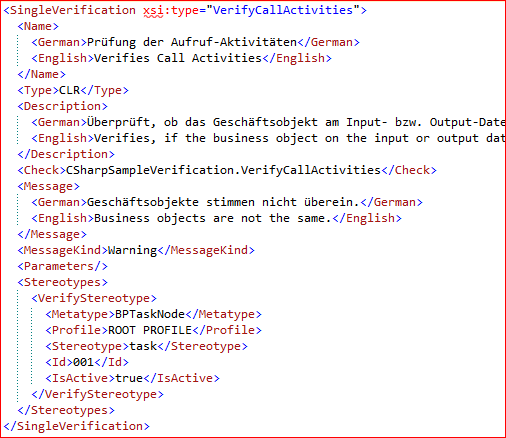
For a generic single verification programmed in a .NET language or in Java, you will create an XML element SingleVerification with the attribute xsi:type=JavaGenericVerification or xis:type=[Name of C# class]. Here you can configure the following:
- Localized name of the verification (XML element Name)
- Type of verification (XML element Type) with the content
- CLR (C# verification)
- JavaGeneric (generic Java verification)
- Localized description of the single verification (XML element Description)
- Qualified name of the C# class or Java class being implemented (XML element Check)
- Localized message text, displayed in the event of an error (XML element Message)
- Type of message (error, warning, information), displayed in the event of an error (XML element MessageKind)
- List of parameters provided when called (XML element Parameters with subordinate XML elements VerifyParameter)
- Name of the parameter (XML element Name)
- Value of the parameter (XML element Value)
- List of stereotypes having model elements that the single verification can be applied to (XML element Stereotypes with the subordinate XML elements VerifyStereotype)
- element type of the stereotype. The API name is used, which you can view using
 Help>Info, for example (XML element MetaType)
 - Defining profile of the stereotype (XML element Profile)
- Name of the Stereotype (XML element Stereotype)
- Verification number(XML element Id)
- Whether the verification is active for this stereotype, i.e. should it run. (XML element IsActive)
- element type of the stereotype. The API name is used, which you can view using
Non-Generic Single Verification
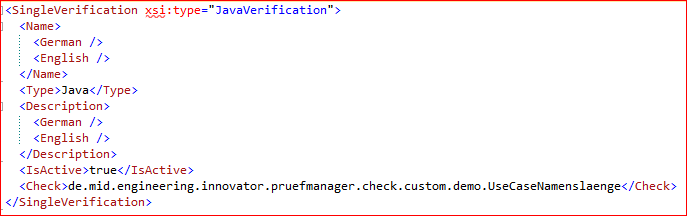
For a verification programmed in Java that is not generic, create an XML element SingleVerification with the attribute xsi:type=JavaVerification. Here you can configure the following:
- Type of verification (XML element Type) with the content Java
- Whether the verification is active, i.e. should it run. (XML element IsActive)
- Qualified name of the C# class or Java class being implemented (XML element Check)
Verification routine
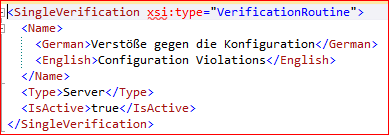
For a verification routine, create an XML element SingleVerification with the attribute xsi:type=VerificationRoutine. Here you can configure the following:
- Localized name of the verification routine. Use the name of the verification routine from the model configuration here. (XML element Name)
- Type of verification (XML element Type) with the content Server
- Whether the verification is active, i.e. should it run. (XML element IsActive)
For the localized text, in each case the English text can be maintained in the subordinate XML element English and the German text can be maintained in the subordinate XML element German.
Prerequisites
- You have programmed verifications in Java for the Verification Manager and these are available as JAR files.
- You have an XML file for configuring these verifications in the $INODIR/java/Verification/conf directory.
- The JAR files are in the $INODIR/java/Verification/bin directory.
- Other JAR files used are located either in $INODIR/java/Verification/bin or in $INODIR/java/Verification/lib.
- There are no files named inoverify.xml in the $INODIR directory.
Context
The Verification Manager can now be started using an engineering action in Innovator. It can only run for Java verifications and is not integrated into the user interface for Innovator. You should therefore transfer from the Verification Manager to the Model Verification Wizard. The switch is simple: If the person performing the verification is to use the Model Verification Wizard instead of the Verification Manager, you can prepare the existing verifications for the Verification Manager for use in the Model Verification Wizard during setup. The single verification programmed in Java can remain unchanged. A verification configuration for the Model Verification Wizard is automatically created from the existing configuration files for the Verification Manager.
How to proceed
- Select the elements which you want to verify.
-
Select the Review>Verify Model>Verification Wizard menu item.
The verification wizard opens and you can select the scope of the model elements to be verified.
-
Select The current selection.
On the next page you can select the verification methods. You will see a migrated verification action for each verification profile of the Verification Manager in the Run Verification Action section. The verification configuration has been saved in the temporary directory, in the file inoverify.xml.
- Copy this file to the $INODIR directory.
You now have a complete verification configuration. - Edit the configuration if you want to give a description for the verification actions or to have names in multiple languages.
Prerequisites
You have a programmed single verification saved as DLL. Any .NET language can essentially be used for implementing the DLL. The examples use the language C#. The DLL file, with a name ending in "Verification", is in the Innovator installation directory, in the $INOEXE/Plugins directory.
Context
As the person setting up verifications, you want to set up the programmed single verification for use by others.
How to proceed
- Create a verification configuration, if none is available.
To do this, create the inoverify.xml file using the inoverify.xsd file in the $INODIR directory, if not already present. - Edit the verification configuration using a text editor or an XML editor.
- Create at least one verification action with a group, a single verification and the type CLR (C# verification).
Prerequisites
You have a verification routine that is to be run by someone else, either in combination with other verification routines or in combination with single verifications.
Context
The person carrying out verification can also run the routines directly or can select them directly in the Model Verification Wizard. Here we are dealing solely with the combination of the verification routine with other single verifications or other verification routines.
How to proceed
- Edit the verification configuration using a text editor or an XML editor.
- Create at least one verification action with a verification routine.
- Input the verification routine here as a single verification.