Element - BPMN Diagram
BPMN diagrams are used for showing business processes.
Definition
BPMN can be used for displaying and developing processes, as well as modeling collaborations of two or more processes using a collaboration's participants.
Interactions between participants are also modeled. Those involved in the process are shown using pools. Interactions between the pools are shown using message flows. Collaboration does not involve central controlling.
Icon
 The icon is of a diagram with a loop in it.
Owner Hierarchy/Prerequisites
A BPMN diagram shows processes and collaborations as
-
Definition (original) or
-
View (referencing view display)
Use
The BPMN diagram can be added to a whiteboard diagram as a node.
Dependencies between processes and elements from other diagrams are shown in the whiteboard diagram.
Elements in a BPMN Diagram
The following model elements can be shown as nodes and edges in BPMN diagrams:
| Icon | BPMN Element | Brief Description |
|---|---|---|

|
Process |
A process is sequence or flow of activities in an organization; the aim of a process is to complete a certain task. It can be displayed either horizontally or vertically. |

|
Horizontal Process | Process with horizontal sequence flow |

|
Vertical Process | Process with vertical sequence flow |

|
Event |
An event is something that happens during the course of a process. These events affect the flow of the process. |

|
Task/Activity | A task is an atomic activity in a process. The task type provides information about the type of activity. Loop properties describe e.g. repetition or parallel or sequential execution of an activity. |

|
Gateway |
Gateways are used to control how the process flows through sequence flows. |

|
Subprocess |
A subprocess is an activity with internal details that have been modeled. |

|
Lane |
A lane is a sub-partition within a process in areas with common properties. Typical common properties include location, role, responsibility. |

|
Data Object |
A data object is a data element with limited validity in a process. |

|
Data Input | A data input is a data element that collects data in the process. |

|
Data Output | A data output is a data element that circulates data in the process. |

|
Data Store Reference | A data store reference refers to persistent data in a data store. They are only valid in the process. |

|
Data Store | A data store is a reusable compilation of persistent data; data store references can be used to access it. |

|
Collaboration |
A collaboration is collection of two or more processes working together; they have no central control and communicate using messages. |

|
Participant (Collaboration Participant) |
A participant represents a partner and/or partner role within a collaboration. |

|
Sequence Flow | A sequence flow is a directed relationship between flow nodes (task, subprocess, gateway, event). |

|
Message flow | A message flow is a directed relationship between participants of a collaboration, between tasks/events of different collaboration participants or between collaboration participants and another collaboration participant's task/event. |

|
Data Association | Data associations link data objects and process elements. They have certain special concepts when they appear in subprocesses, tasks or events. Data associations cannot traverse process boundaries as data objects only exist within a process. |
The BPMN diagram contains not only those elements which can be seen but also those which can be shown linked to the visible elements. These dependent elements can often be made visible using the respective configuration.
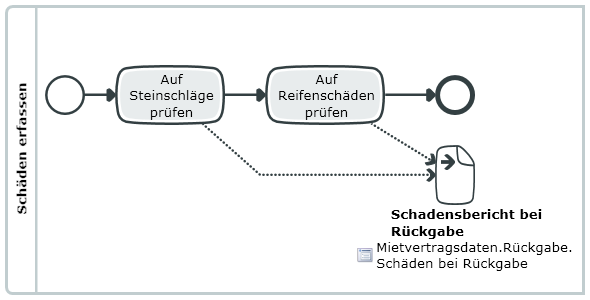
Example for a BPMN Diagram
Further Information
 Related Topics