Icon
 The icon is of a diagram with a key table in it.
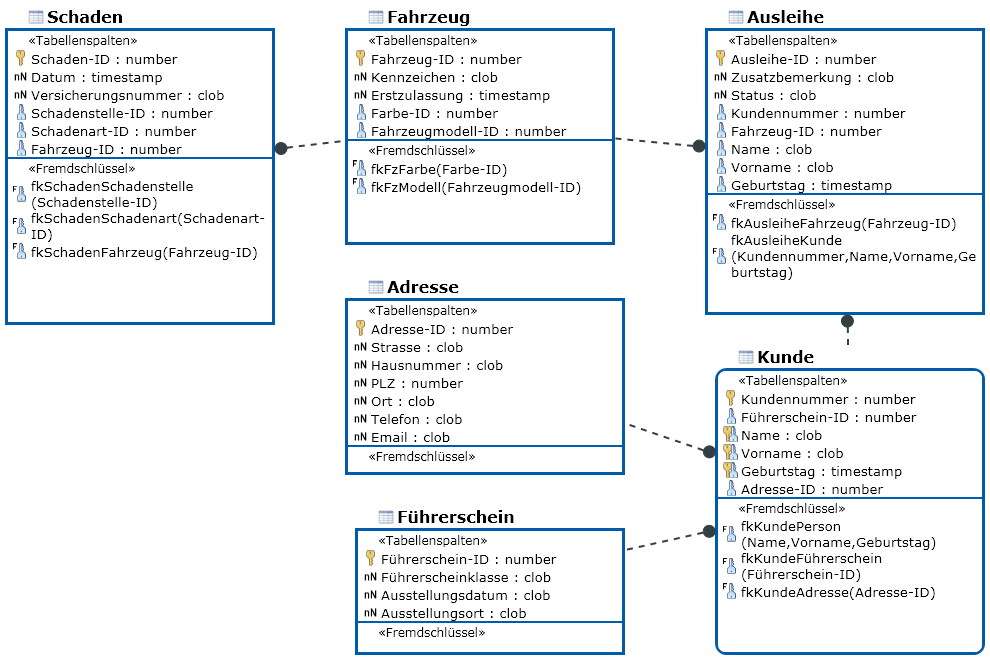
Elements from the IDEF1X notation are used for displaying database schema.1IDEF1X is a modeling language in the ICAM standard (Integrated Computer Aided Manufacturing) and belongs to the group of IDEF languages (ICAM Definition).notation used. Database diagrams illustrate the foreign keys in the database schema. The foreign key columns' properties initially calculate how the foreign keys are displayed.
A database diagram is a graphic representation of any part of a database schema. It can be a complete or partial image of a database's structure. It contains tables with columns and foreign key edges between the tables.
The icon is of a diagram with a key table in it.
You can use the database diagram to model a submodel of the database schema.
Entities are shown as nodes and relationships are shown as edges.
The following model elements can be shown as nodes in database diagrams:
| Icon | Element | Description |
|---|---|---|

|
Database Table | Database tables are normally initially created from entity types of the conceptual schema. You can create e.g. indexes and triggers in the DB table; it is also possible to create technical table columns. |

|
Table Column | Database table columns are normally initially created from attributes of the respective entity of the conceptual schema. |

|
Alternative Key | Creates an alternative key in a database table. The primary key is automatically created when the table is created or with the primary property on a column. |

|
computedColumn | Creates a new instance of the 'table column' element type. |

|
Database View | DB views are linked with DB tables or DB views they are made up of using From clauses. Use the DB diagram as you would when creating relationships. DB diagrams which contain DB views are used for visualizing their composition and, in doing so, their dependencies. |

|
View Column | As a means of support, a View column is created in the database view for each table column in the table referenced by FROM. You only need to delete the View columns you do not want in the DB view. |

|
Index | Indexes are used for speeding up database access when searching and sorting. |

|
Trigger | You can use triggers to maintain automatic values of table columns when updating, inserting or deleting. This ensures constraints are directly saved in the database without the individual application having to worry about it. |

|
Verification Condition | The constrained expression verification condition creates an SQL check constraint in a database. |
© 1986-2014 MID GmbH Nuremberg Germany. DIN EN 9001 certified. All rights reserved.