Innovator Architecture
Innovator uses a client/server architecture.
Innovator is designed as a client/server system. All data is collected in data pools (repositories); clients do not have direct access to these. Administration of a repository falls to a single server program. The server ensures
- Consistency of managed data within models
- Reciprocal exclusion of users from processing the same elements
- Central management of users and access rights.
One server is responsible for one repository. The contents of a repository can include any models and any number of these models.
Architecture Elements
Online Repository
The data management system provided by Innovator is called the online repository. In this context, online means that every person working on a model is informed of the current state of the model at all times. This is guaranteed by the fact that clients are in constant communication with the repository server and they immediately transfer modified data to the server in highly compressed packages.
This means that there is no need to "check out" or "check in" to modify data and make the modifications accessible to other users. This avoids long consolidation time, which is always the case for offline operation.
Locking Concept
Any number of users can always work on a model at the same time. The Innovator repository is equipped with a locking concept to ensure that an element cannot be changed by more than one user at the same time. This allows a user to reserve elements and diagrams for modification. Other users continue to be informed of the current state of the locked object, but cannot actually make changes to it at that time. These features are part of an extensive access rights system, which enables the model administrator to grant and withdraw not only access rights, but privileges and execution rights as well.
Network/Teamwork
Modeling is usually done in teams. For this reason, Innovator architecture is designed for multi-user operation, based on common data storage using a . Server and client programs do not have to be available on the same computer. The only requirement for working with a repository is that the server and client computers are recognized within the network and are able to communicate with each other. It is not necessary for them to be related via integrated drive areas.
Under MS Windows and Unix, protocols called TCP/IP (Transmission Control Protocol/Internet Protocol) enable network operation of Innovator editions.
There is no limit to either the number of clients or repositories in the network. Any number of repository servers can be started on an Innovator network and these can be accessed by any number of users. On entering the interface editing mode, the user is given the opportunity to work on any of the repositories for which servers have been started, and the models contained therein. Irrespective of the physical location of the data in the network, in principle, this enables every Innovator user to work with every model. User and authorization management in Innovator makes it possible to control access to individual models and the authorizations in them.
License Server
Role of the License Server
In Innovator, there is no fixed assignment of repositories to computers. Repositories can be transported between computers and operating systems without the need to reconfigure the user system. This flexibility is based on the assumption that there is a "static pole" in the network which mediates the initial contact between repository servers and clients.
The license server undertakes these tasks. This program is started on a computer specified during the installation. This computer is conveyed to every client computer and every repository server computer. These settings need to be changed if the license server computer is changed.
When the license server is started, every repository server communicates certain significant data to it regarding the repository. As a result, the license server can then forward this information to the clients. When a user selects a model, the license server coordinates the initial contact between repository server and client. The actual data traffic between the two computers is then carried out directly. Even so, contact to the license server is maintained on both sides.
Given its central position in the coordination of communication, the license server is also responsible for license management in Innovator.
Licensing
Innovator can be used as individual products. These products can, in turn, be used as tools for individual modeling methods or as parts of such methods. Varying numbers of licenses can be purchased for each of the products. A license permits the use of a product and the number of licenses determines the number of Innovator users who can work with one product at the same time. It is thus possible to purchase the exact number of licenses required for individual task areas, such as analysis, design, and implementation.
Example of a Heterogeneous Network
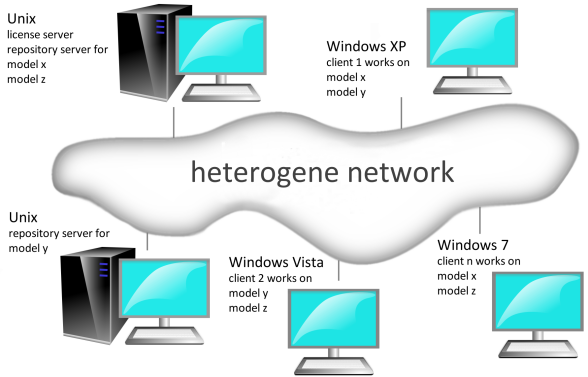
Licenses are not bound to individual operating systems or computers, but are made available for general access for the respective license server. If a user is working with a specific product, the license server sets aside a corresponding license, and when the user stops working with the edition, the license is released again. In other words, Innovator license management is carried out very dynamically.
Given both of these functions, it is clear why all other Innovator programs require the license server to be running.
Managing the Architecture
The potentially complex architecture of Innovator means that a small amount of input is required to define individual structures. This input needs to be carried out upon installation. However, this can also be easily changed in the program setup at a later stage.
Different operating systems use specific techniques for storing these settings. The registration settings are stored in the tab under Microsoft Windows. Under Unix the individual settings are assigned to environment variables. The following talks about environment variables in general.
Some settings, pertaining to the following questions, are absolutely necessary:
Entering the License Server Host Name
Which computer will the license server run on?
This setting is of critical importance for operating Innovator. Due to its central position in the Innovator architecture, the main license server must be accessible from every computer that will run Innovator programs.
The computer that will run the license server must be determined during installation. Although it is possible to change it at a later date, this would require all Innovator licenses to be activated by MID GmbH again.
Specifying Users
Should the installation be carried out for the current user or for all users?
This specification determines which start menu director the program group will be stored in and where the Innovator entries will be stored in the registration. The Innovator server can only be set as services if the entries are made for all users on the local computer.
Programs, Settings, Repositories
Where should programs, settings and repositories be located?
Specifying installation directories determines where the executable programs, common data and settings will be available. The settings contain the directories for repositories and parameter files. These directories can be modified in the setup program once installation has taken place. This is particularly significant if working with network drives.
If you are using the so-called "Services" under MS Windows, the repository directories should not be located on network drives.
For more details, and other questions regarding the use of Services, see: Administration Manual, chapter 3.2.2, "Integrated Service Management Under Windows".
Environment variables
The following table provides an overview of the most important settings defined during the Innovator installation. The first column lists some expressions that are frequently used in the installation programs and in this introduction, the second column lists the environment variables that contain the relevant data. The third column contains explanations.
| Meaning | Environment variable | Description |
|---|---|---|
| License server computer | INOHOST | Computer on which the license server is to run and details of the communication channels in the format <License server host name>.<port number> |
| Language setting | INOLANG | Details of the language to be used for Innovator operation The installation package language is used as default. |
| Repository directory | INOPRJ | Default directory path component which repositories (projects) are maintained and stored in. |
| Settings (parameter settings) | INODIR | Directory path that the parameter files are or will be stored on; documents and help files, icons and the Java files for engineering actions etc. can also be found here. |
| Directory for Tclscripts | INO_TCL_LIBRARY | Storage location for scripts that use the Innovator Tcl API (Innovator classiX only) |
| User-specific settings | INOHOME | The parameters in the INODIR directory are intended as central defaults. The individual user can override these specifications using their special settings. These are stored in the INOHOME directory. If these variables are not explicitly set, then a sub directory in the %UserProfile% directory specified by the operation system is automatically used. |
Further specifications are possible and/or necessary. They are described in the installation chapters for the respective operating system type.
Some of the environment variables do not have to be set on all operating systems.
Repository Server and License Server
The repository server contacts the license server in regular intervals. However, the license server may also call the repository server to determine whether it is still running (this behavior can be deactivated if necessary).
For communication between repository servers and clients, the range of port numbers can be derived from the license server's port number specified upon installation and according to the maximum amount of concurrently running repositories.
P is the port, which is fixed for the license server computer (e.g. 11500). The repository server tries to connect to the p+1 port (e.g. 11501) first. If this port is already assigned, the consecutive one is checked until a free port is found. Because of this, a possibly existing firewall between license server ((inoadm.exe) for the administration program or main and project license server), repository servers and clients has to allow all IP connections from and to the port of the license server (e.g. 11500) as well as all connections in the port range for communication between repository servers and clients.
A certain port number can be set for each repository server for opening the connection .
If you use Unix as your operating system and frequently start up and shut down repositories, you should use a few other ports. This should be done for security reasons, since Unix only releases ports after a time specified by the Unix administrators (up to 30 minutes).
Communication between Server and Client
Innovator requires Message Queues for communication between the Server and the Client (e.g. Oracle and MySQL). The default on most operating systems is too low for message queues, particularly when a lot of Clients are using it. If this is the case, an error message "cannot create message queue" often appears. We recommend increasing the value of the message queue to at least 256.
- Under Solaris, input the number of available message queues in the /etc/system file:
set msgsys:msginfo_msgmni=256
This file can be edited in root. The change is implemented after rebooting. - You can verify the current value with the command ipcs -ql using SuSE Linux.
Input the number of available message queues in the /etc/sysctl.conf file:
kernel.msgmni = 256
The new value will be adopted upon reboot or directly by inputting sysctl -p in the console.
The amount of message queues being used in the current system should be verified after a certain amount of time using the ipcs -q command (in Innovator or databases). Adjust the value in such a way that it offers adequate reserves.
ipc does not alter the message queues of processes which have been unexpectedly ended in Unix. If necessary, these can be engaged with the ipc command so that the message queues can be used again.
Sample Configuration for a Heterogeneous Network
The following example assumes that Innovator is to be operated on a heterogeneous network consisting of one Unix and multiple MS Windows systems. The network connection is based on the TCP/IP protocol. The Unix computer will run the license server.
The following illustration provides an overview of the configuration.
Example of a configuration in a heterogeneous network
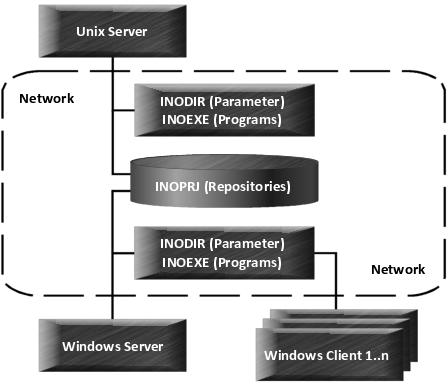
It is assumed that network drives can be used. This allows you to save disk space by using common directories. It also makes the installation, updates and future maintenance easier. These advantages come at a cost, however, in the form of longer load times for programs and longer access time for data.
Programs
The programs must, of course, be stored at least once for each operating system. For both Unix and Windows computers, only one directory each (INOEXE) is selected for storing the programs.
Settings (parameter settings)
The settings (INODIR) are also stored once for each operating system and shared. It is also essentially possible to use one directory for all computers. Path details are specific to an operating system and must therefore be avoided in central parameter files. The appropriate entries must then be entered in the area set aside for user-specific settings (INOHOME).
Repositories
The repository directory (INOPRJ) is the same for all computers. As a result, repositories from this directory can be loaded from any of the computers concerned.
This is often undesirable. If central repositories should run on a certain computer then the INOPRJ variable should not be set on other computers. In this way other computers are spared the load of the running repository servers.
Repositories should always be stored in directories that are backed up regularly.
As a rule, repository servers should be started on high-performance computers. When deciding which computer to use, you should consider the properties of the operating system, network management and the resources available (processor, main memory etc.).